Multi-Platform Goal Widget
One bar. Every goal. Every platform.
Stop stacking goal widgets
Most goal overlays show you one number. So you add a second widget for your Kick subs. Then a third for followers. Before long you’ve got four bars fighting for space and an overlay that looks like a dashboard.
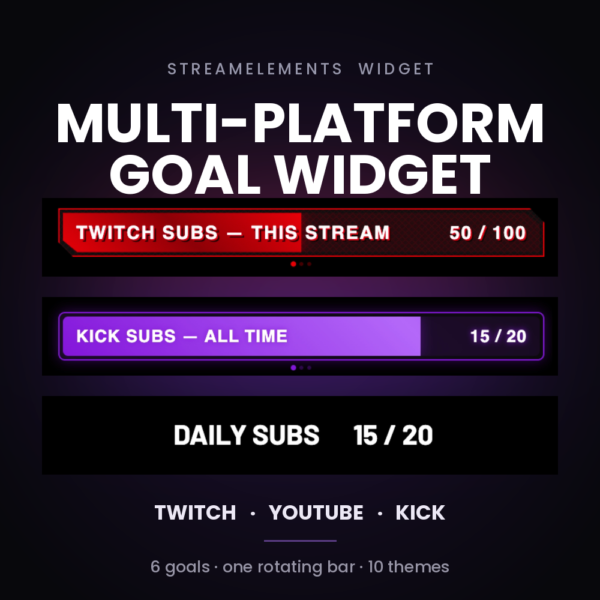
The Multi-Platform Goal Widget replaces all of them. One clean bar that rotates through up to six goals — your Twitch sub goal, your Kick sub goal, this week’s followers, this month’s tips — cycling on a timer you control, with a smooth animated handoff between each one.
Five dropdowns. One goal.
The setup looks powerful because it is, but each goal only asks five questions:
| Platform | Twitch, YouTube or Kick |
| Count | Subs, Members, Followers, Tips, Bits, Kicks, Superchats and more |
| Period | This Stream · This Week · This Month · All Time |
| Target | The number you’re chasing |
| Title | Write your own — or leave it blank and the widget names it for you |
Want your Twitch subs for the session and for the month? That’s two slots. Same platform, same count, different periods, different targets, different titles.
Mix and match however you like. Enable one goal and it sits there permanently. Enable six and it cycles through all of them.
Actually multi-platform
Enter your StreamElements channel IDs once and the widget connects to every platform simultaneously — not just the account your overlay happens to live on. Every goal updates in real time as events land, wherever they land.
Multi-streaming to Twitch and Kick? Both numbers stay accurate, side by side in the same rotation, without a second widget or a second overlay.
Ten themes. Or make your own.
Drop-in styling that already looks finished:
Neon Cyberpunk · Glassmorphism · Gaming RGB · Retro Synthwave · Neumorphism · Pixel Art · Animated Gradient · Black/Yellow · Red/Black · Purple
Prefer something quieter? Plain Text mode strips the bar and the chrome entirely, leaving clean readable text anchored to your layout — perfect for minimal overlays where a progress bar would shout too loud.
Or choose Custom and set every colour, font, weight and size yourself.
The details you’ll actually notice
Rotation dots — show how many goals are in the cycle and which one you’re on
Scramble text effect — titles decode into place on every swap (toggleable)
Goal-reached state — the bar pulses the moment you hit target
Preview buttons — step through every goal and simulate progress right in the settings panel, no waiting for real events
Channel ID override — point any platform at a specific channel, including the one the overlay is installed on
Tune everything — rotation speed, font family, weight, size, text offsets, bar colours, section spacing
What you’ll need
- A StreamElements account with an overlay you can edit
- Your platform accounts connected to StreamElements
- For multi-platform tracking: the StreamElements channel ID for each platform you want to read
Straight talk about platform support
Data comes from StreamElements, so each platform can only report what StreamElements tracks for it:
- Twitch — subs, followers, tips, bits
- YouTube — members, subscribers, followers, superchats
- Kick — subs, followers, tips, Kicks
FAQ
Can I show fewer than six goals? Yes. Enable one and it displays permanently with no rotation. Enable two or more and it cycles.
Can two goals use the same platform? Yes — it’s one of the most common setups. Same platform, different periods or targets.
Does it work if I only stream on one platform? Absolutely. Multi-platform is optional. Leave the other channel ID fields blank and it behaves like a normal goal bar with rotation.
Will it keep counting if I refresh my overlay? Yes. Totals come from StreamElements, so nothing is lost on refresh or between streams.
Can I change the wording? Every goal has its own title field. Leave it blank for an auto-generated one.
Does it work with my existing overlay? Yes. It’s a standard StreamElements custom widget — add it to any overlay, size and position it like anything else.