

Stop stacking widgets on your overlay
A socials bar. A sub counter. A follower counter. A goal bar. A hype train.
That’s five things fighting for space, five sets of colours to keep in sync, and five widgets to reposition every time you rebuild a scene.
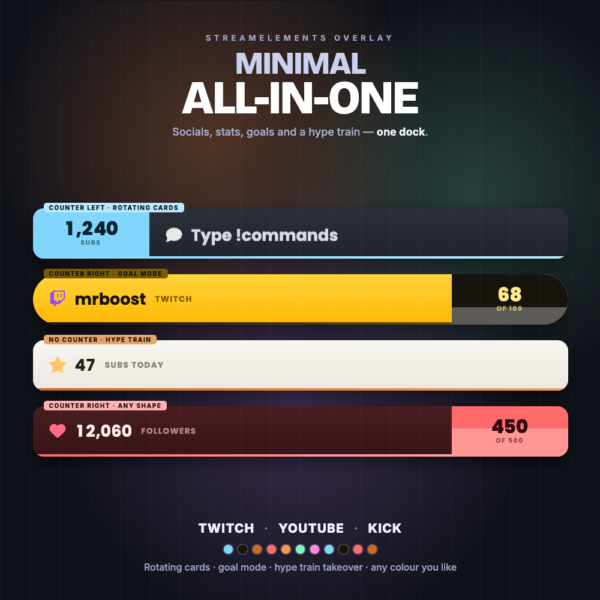
The Minimal All-In-One Widget is one dock that does all of it — and only ever shows you one thing at a time, so it never gets loud.
🔁 One stage, everything takes turns
Instead of cramming everything side by side, a single area cycles through whatever you want it to show:
- Your socials — up to 8, with their own icons and colours
- Live stat cards — up to 4, each showing subs, members, followers, bits, tips or Kicks, over this stream / this week / this month / all time
- Your own messages — anything else you want on rotation
Each card slides up as the last one slides out. Long handles scale to fit instead of getting cut off.
🔢 A counter that never moves
One number stays put at the end of the dock — your headline stat, always visible.
Set it to a running count, or switch it to goal mode and the block itself fills up as you close in on the target. Turn on a rolling goal and the target raises itself every time you beat it, so the bar never sits full for the rest of the stream.
Put it on the left, put it on the right, or turn it off entirely.
🚂 The train takes over
When a hype train starts, the whole dock flips into it — a level badge, a progress bar filling toward the next level, a live contribution count and a draining timer.
When it’s over, it slides away and your rotation picks up exactly where it left off.
Levels get progressively harder at a rate you set, so a big night keeps climbing instead of maxing out in the first two minutes.
🌐 Three platforms, counted together
Enter your StreamElements channel IDs once and every platform feeds the same widget, live.
And every readout picks its own platforms. Combine your Twitch and Kick subs into a single number. Or show them as two separate cards. Or make the combined figure a goal. Each counter and each stat card decides for itself.
Kicks are supported too — StreamElements doesn’t report Kick’s tipping currency at all, so the widget reads it straight from Kick and counts it alongside everything else.
YouTube memberships are handled properly, too: pick “Subs” and YouTube contributes members, not its free subscriber count. No setting to get wrong.
🎨 Make it yours
- 7 built-in themes, or switch to Custom and every surface becomes a colour picker
- 3 shapes — fully rounded, soft corners, or square
- Any Google font, with independent size and weight controls
- Paste Font Awesome icons straight from their site — the whole
<i class="...">tag works, no editing needed
What you’ll need
- A StreamElements account with an overlay you can edit
- For multi-platform counting: the StreamElements channel ID for each platform you want included
Installs on Twitch, YouTube or Kick — the download includes a one-click install link for each.
FAQ
Do I have to stream on all three platforms? No. Leave the extra channel IDs blank and it works perfectly as a single-platform widget.
Can I show fewer things? Yes. Socials, stat cards, messages, the counter and the train can each be turned off. Turn everything off but your socials and it’s a clean socials bar.
Can two cards count different platforms? That’s the idea. Every counter and stat card has its own Twitch / YouTube / Kick toggles.
Does it work with my existing overlay? Yes. It’s a standard StreamElements custom widget — drop it in and position it like anything else.